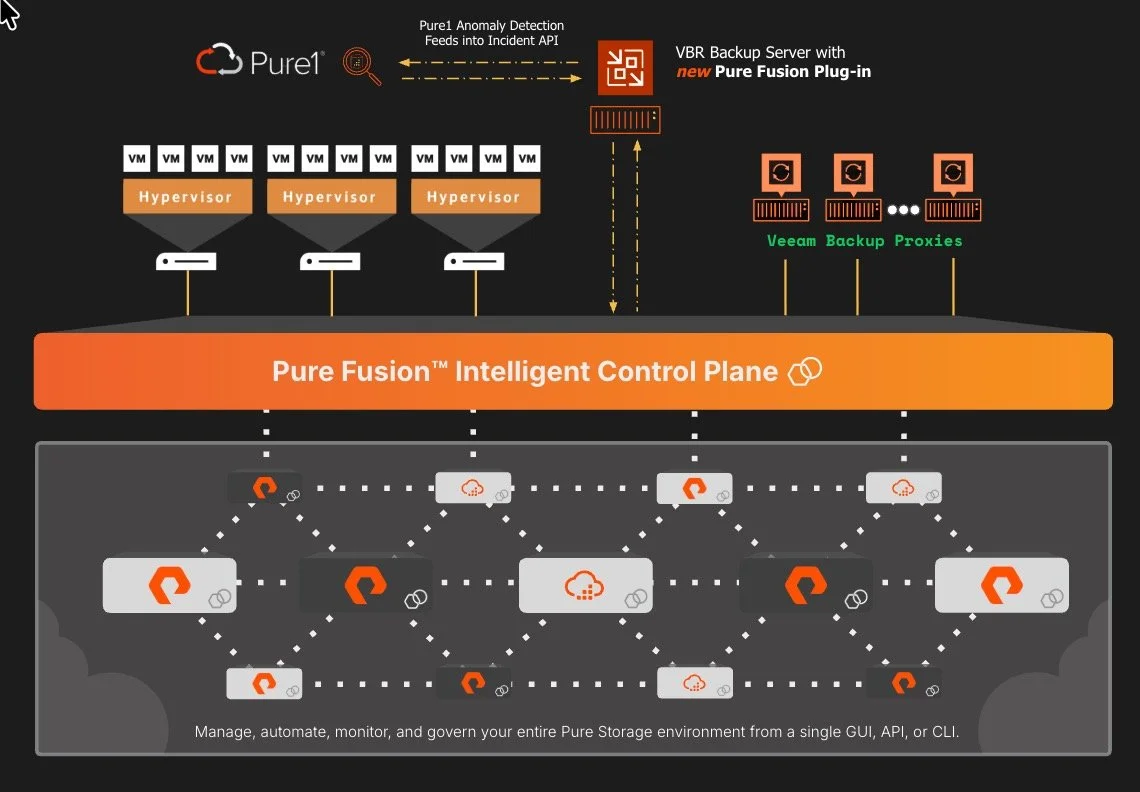
Pure Fusion Meets Veeam: Fleet-Wide Orchestration Realized
Architecturally unique
Embedded it directly into Purity
Systems to intercommunicate to:
Discover and Manage
Automate, monitor, and govern
Single common endpoint or API
Federate into one virtualized cloud of data
Remote Management
maximizing utilization
dynamically rebalance themselves
If you’re already a fan of the Pure Storage FlashArray plug-in for Veeam, then you know the value of snapshot-based backup orchestration. (maybe link to my youtube here) Efficient backups, instant recovery from meta data driven snapshots, offloading the backup burden from your ESXi hosts. It works.
But the plug-in has always operated at the individual array level. You configure each FlashArray in Veeam, set up your jobs, manage your snapshots, across each array. For customers with two or three arrays, that's fine. But what if you have a significant fleet? Dozens of arrays? across multiple sites? Your operational overhead that compounds.
The Pure Storage Fusion integration changes that equation entirely.
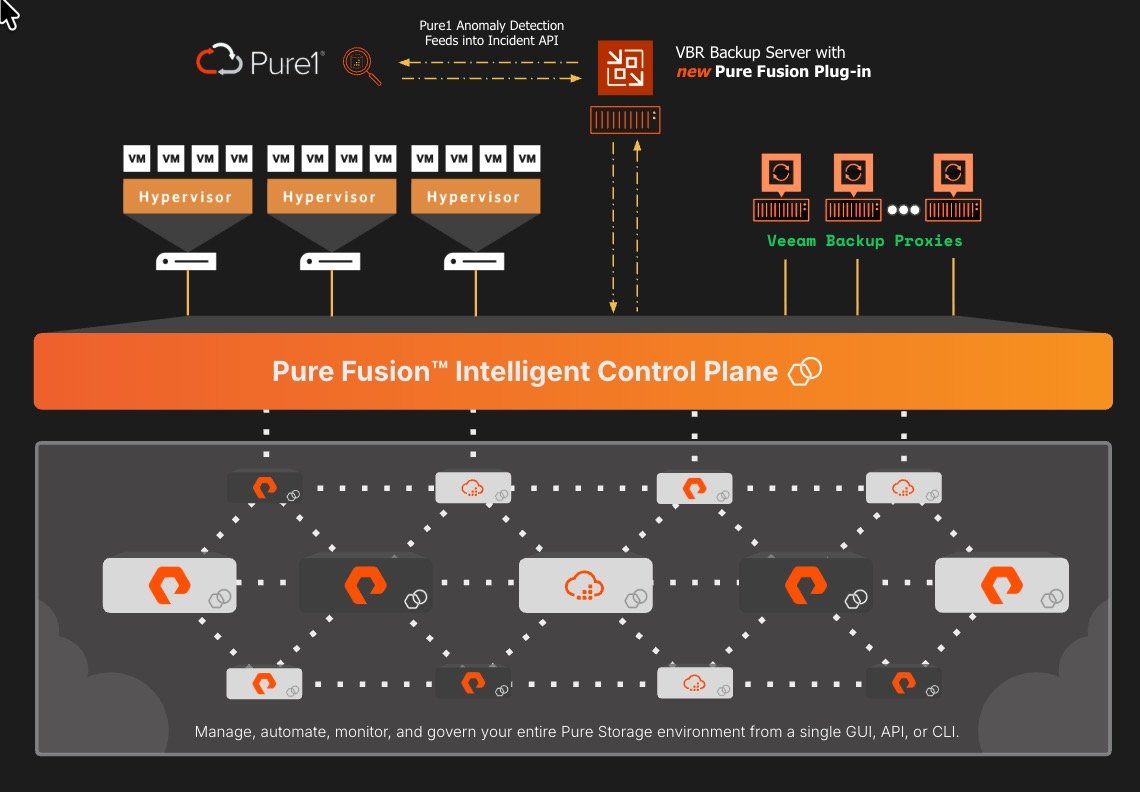
Federate into one virtualized cloud of data
From Single-Array to Fleet-Wide
The new integration connects Pure Fusion with the Veeam Data Platform. If you're not familiar with Fusion, hold on, cause Pure figured out the intelligent control plane. Fusion provides unified management across your entire FlashArray fleet. No more thinking of arrays as individual objects. Think of it as the orchestration layer that enables what we label as the Enterprise Data Cloud.
What does that mean for Veeam integration?
Automatic array registration. When you add a FlashArray to your Fusion fleet, it can automatically register in Veeam. No manual configuration per array. No logging into each system to set up credentials to start managing with policy-based protection. Just define your protection policies once and enforce them across every datastore in the fleet. Instead of configuring backup jobs array by array, you're managing policy at the fleet level.
Fleet-wide recovery operations. Run recovery jobs across your entire environment without custom scripting or one-off configurations. The integration handles the orchestration.
Faster Remediation: Kick off your remediation workflow almost instantaneously with integrated Pure1 Anomaly Detection and Veeam Incident API across your entire fleet.
This isn't incremental improvement, it's a fundamental shift in how the two platforms interact.
Why This Matters for our Customers
With the Pure Enterprise Data Cloud foundation, they can start managing their data, and stop managing storage. Fusion is the Intelligent control plane making it all possible.
This Veeam-Fusion integration extends that philosophy to data protection. Backup and recovery become part of the storage platform rather than something bolted on separately. The same fleet management capabilities you use for provisioning and performance monitoring now apply to protection and recovery across your entire fleet.
For customers using or evaluating Pure, it's a differentiator worth understanding. Consistent Data Protection policies and runbooks are the key to being resilient across various layers of threat and failure domains.
““At Pure Storage, our philosophy has always been to simplify how infrastructure is built and operated. With the Veeam and Pure integration, that same philosophy extends naturally to data protection. Backup and recovery become part of the storage platform itself, not something bolted on as an afterthought. The same fleet management capabilities customers rely on for provisioning and performance now apply to protection and recovery across the entire environment. For organizations using or evaluating Pure, this is a meaningful differentiator. Consistent data protection policies and operational runbooks are foundational to cyber resilience, especially when navigating multiple threat vectors and failure domains.” ”
The Technical Foundation
The integration is built on Veeam's Universal Storage API, which enables storage vendors to develop and update their plug-ins independently. That architecture means Pure can deliver features and fixes on their own release cycle rather than waiting for Veeam engineering releases.
It also means VSA compatibility is on the roadmap. The Universal Storage API v2.1 introduced in Veeam V13 enables storage vendors to make their plug-ins work with the Veeam Software Appliance. If you're planning a migration from Windows to VSA, the Fusion integration is being built with that path in mind.
Bonus Support: The Pure Storage Fusion plugin will be the first of it’s kind USAPi enabled and planned to work with the Veeam v13.1 hardened Linux Appliance
Who Benefits Most
Let's be direct: if you have a single FlashArray, the existing plug-in probably serves you fine. The Fusion integration really shines when you have:
Multiple FlashArrays across sites
Complex protection requirements that vary by workload
A need to reduce manual configuration overhead
Interest in integrated anomaly detection and incident response
The operational complexity reduction compounds as your fleet grows. What's manageable at three arrays becomes painful at fifteen and unsustainable at fifty.
Getting Started
The integration is activated through the Pure array.
Here is a great overview on the Pure 360 site. You can find a walk through and this video where I explain why this integrated solution matters
You'll need to:
Create a Pure Fusion fleet . As a Pure Customer who hasn’t, what have you been waiting?
Download and install the Plugin to your Veeam Server.
Define your Fusion Fleet in the Veeam UI
Pure has published deployment documentation covering requirements and configuration steps. If you're a Pure customer, your account team can point you to the right resources.
The Bigger Picture
This integration represents where enterprise data protection is heading: tighter coupling between storage platforms and backup infrastructure, with orchestration layers that abstract away per-device management.
For customers running both Pure and Veeam this is worth your time. And needs to be part of your roadmap planning. Especially if you're already looking at Veeam V13 upgrades or VSA migration.
The sequencing matters. Getting stable on V13 now positions you to adopt this integration cleanly when your environment is ready.

Unleashing Fusion: A New Era of Storage Automation with Pure Storage
Introducing Fusion, a groundbreaking feature that takes storage management and automation to a whole new level. Built into every Pure Storage array and now generally available, Fusion is here to redefine how you manage your data. Let’s take a closer look at what makes Fusion a must-have for modern IT environments.
What is Fusion?
At its core, Fusion is about simplicity, scalability, and control. It enables you to non-disruptively federate all your arrays—existing and new—into a single, seamless fleet. Once federated, these arrays communicate peer-to-peer, eliminating the need for external management systems or cloud control planes.
But Fusion doesn’t stop there. By turning every array into a management endpoint, it allows you to manage your entire storage fleet from anywhere—streamlining operations like never before.

Why Fusion is a Game-Changer
Here’s why Fusion stands out:
Effortless Fleet Federation
Fusion allows you to create a unified fleet of arrays, regardless of whether they’re new or already deployed in your environment.
Zero Added Complexity
Forget additional tools or systems. Fusion is built into Purity, meaning the functionality arrives with a simple upgrade.
Comprehensive Visibility and Control
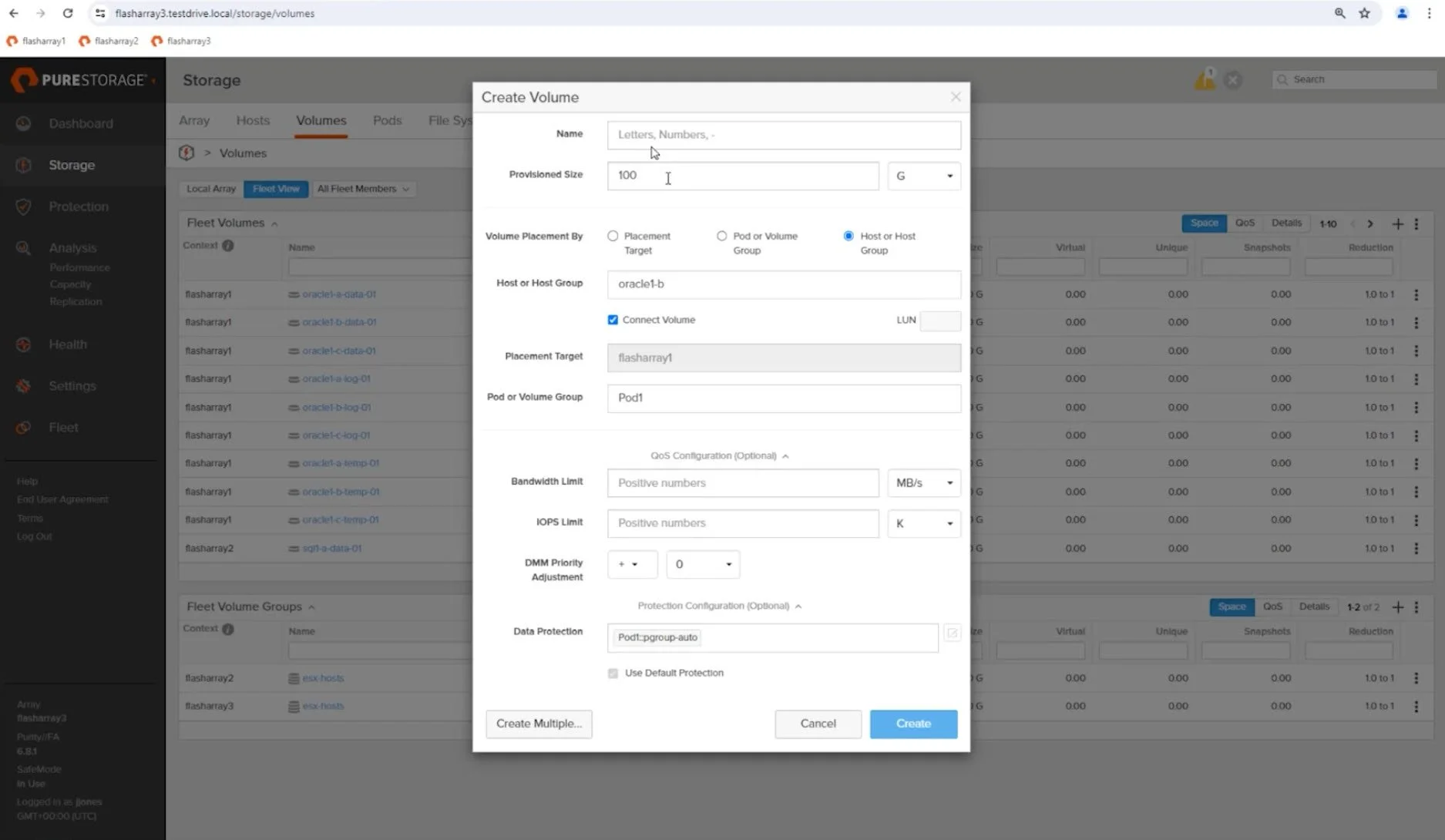
Manage storage volumes, hosts, pods, and more across your fleet, all from the intuitive Fleet View interface.
Enhanced Security
Fusion integrates with LDAP to ensure secure access and permissions management across the fleet.
Future-Ready
With an intelligent design, Fusion is ready to evolve with future updates, making it a long-term investment in your IT infrastructure
Setting Up Fusion: Simple Steps for a Unified Fleet
Setting up Fusion is incredibly straightforward. Here’s how you can get started:
Step 1: Create or Join a Fleet
Use the new Fleet Management menu in the Purity UI.
You’ll be prompted to either create a new fleet or join an existing one.
For new fleets, simply give it a name you’ll remember and generate a fleet key. This one-time key authorizes other arrays to join the fleet securely.
Step 2: Add Arrays to the Fleet
On each array you want to add, select Join Fleet and enter the fleet name.
Paste the fleet key to authenticate the addition. This step ensures that only authorized arrays join your fleet.
Step 3: Manage Your Fleet
Once federated, your arrays function as a single system. Every array becomes a management endpoint, meaning you can configure and monitor the entire fleet from any node.

Fleet Management in Action: Real-World Use Cases
Let’s explore what Fusion enables you to do:
Unified Volume Management
Fusion introduces a Fleet View, allowing you to see storage volumes across all arrays in your fleet.
Whether you’re provisioning storage or managing existing volumes, Fusion simplifies operations by consolidating visibility.
Dynamic Workload Placement
Create new volumes, pods, or hosts and let Fusion handle the logistics. You can specify placement at the array, pod, or group level, ensuring optimal resource usage.
Data Protection at Scale
Apply protection policies across the entire fleet with ease. Whether it’s snapshots, replication, or disaster recovery configurations, Fusion ensures consistency.
Streamlined Operations
From creating a volume to managing hosts, every operation you’d perform on a single array is now fleet-wide, all managed through the same Purity commands.
For example, in a demo setup:
Three arrays were federated into a fleet named "FusionOne."
From any array in the fleet, it was possible to view and manage objects such as volumes and pods across all arrays.
Operations like provisioning storage, applying protection policies, and attaching volumes to hosts were performed without logging into individual arrays.

The Roadmap for Fusion: What’s Next?
While the first release of Fusion introduces fleet federation and unified management, there’s more to come. Future updates will include a catalog feature to further enhance automation. Here’s what’s planned:
Preset Workload Templates: Define workload configurations in advance, complete with optimized settings.
Intelligent Recommendations: Fusion will analyze your fleet and recommend the best array for workload placement, ensuring optimal performance and resource utilization.
With these advancements, managing storage fleets will become even more intuitive and efficient.

Why You Should Upgrade to Fusion Today
Whether you’re managing a small environment or scaling up to enterprise-level operations, Fusion offers the flexibility and control to simplify your storage management.
Now generally available with Purity 6.8.1, all it takes to unlock these powerful features is a simple non-disruptive upgrade. If you’re ready to transform how you manage data, Fusion is the answer. Reach out to get started!
Final Thoughts
Fusion represents a significant leap forward in storage automation. By federating your arrays into a unified fleet and enabling centralized management, it allows you to focus on what matters most—your data, not the infrastructure supporting it.
As always, I’d love to hear your thoughts and experiences. If you have questions or want to see Fusion in action, don’t hesitate to reach out. And if you found this post helpful, be sure to share it with your network.
Until next time, stay innovative and keep pushing the boundaries of what’s possible.
Check out the video below for a walk through!
Short discussion with JD Wallace from PURE
A quick discussion with my friend and former Veeam collegue, JD Wallce- Principal SE for PURE Software.
Originally posted to his blog- @JDwallace.com
Visit here JDWallace.com